
Have you just bought a shiny new game card for your favorite battle royale game? Knowing exactly how to Redeem V-Bucks can feel a bit confusing at first. Do not worry! This guide is here to help you through every single step. We will make sure your in-game wallet gets loaded up safely.
I remember when I first tried to add a code for my kid. I was so scared of typing it in the wrong place and losing the money. But once you know the right website to visit, it takes less than two minutes. Let us dive right in and get those cool cosmetics and outfits into your game locker.


Grab Your 16-Digit Code
Before you turn on your computer or console, find your game card. Flip it over gently. You will see a silver scratch-off area on the back. Take a coin and scratch it off slowly so you do not rip the paper.
You are looking for a special 16-digit code made of letters and numbers. Make sure you keep your receipt in a safe place, too. Just in case there is a glitch, customer support might ask to see it. Treat this code like cash. Do not share it with anyone online.
Log into Your Epic Games Account
Your next big step is to visit the official website. Open up your web browser and go to the main portal. You need to sign into your existing Epic Games account. This is the account you use to play the game on your system.
Be super careful here! Double-check that you are logging into the correct profile. If you play on a console like PlayStation or Xbox, you can click the console icon to log in. Funds cannot be moved to a different profile once you claim them.
Head to the Code Redemption Page
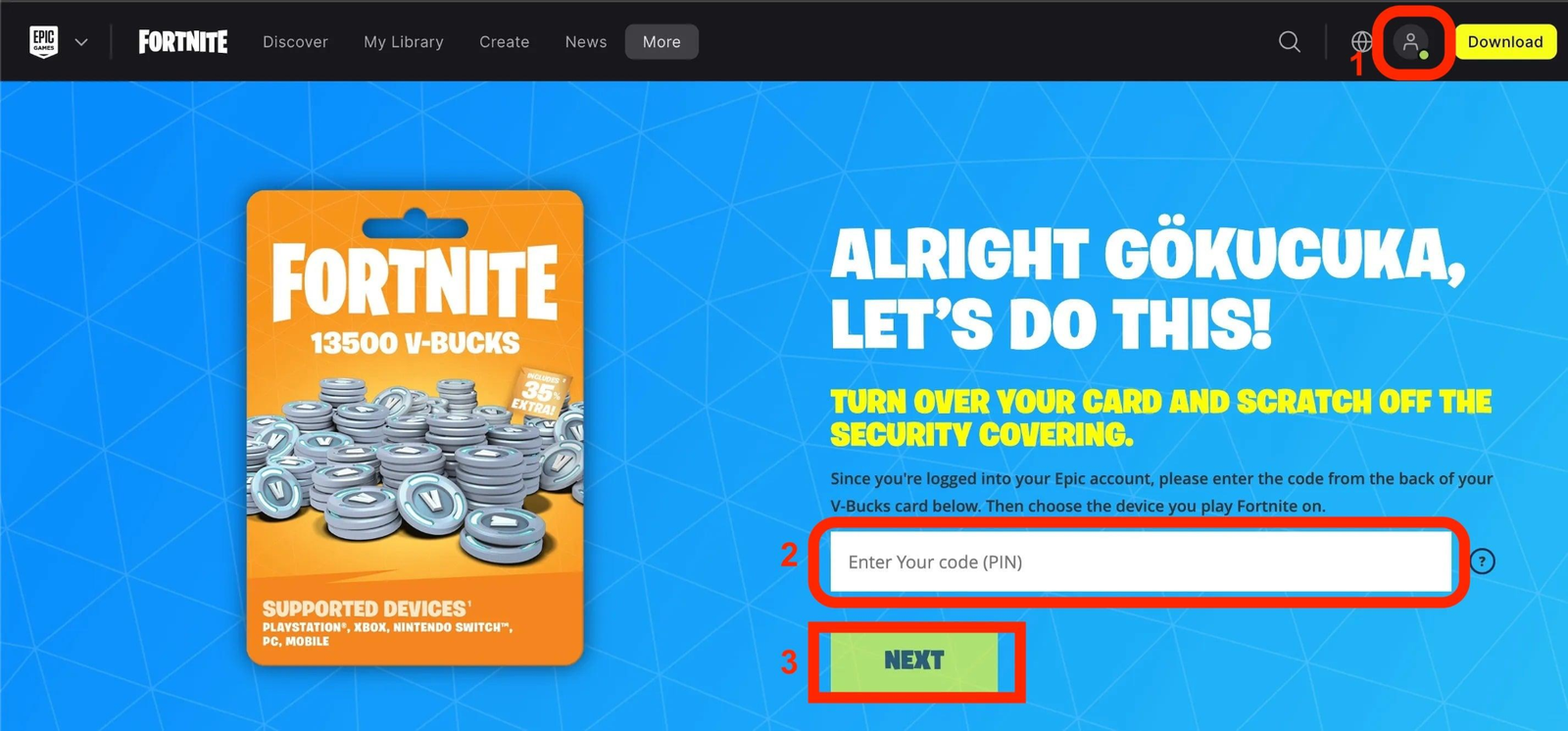
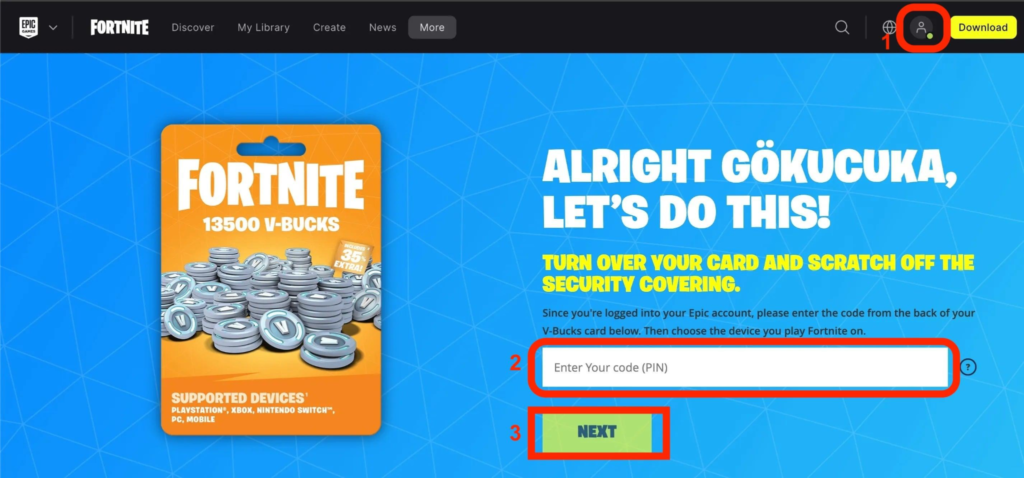
Once you are logged in successfully, look at the top right corner of your screen. Click on your display name icon. A small menu will pop up showing different options.
Click on the link that says V-Bucks card or go straight to the main redemption page. This page is built just for adding funds. It has a safe box waiting for your secret numbers.
Type in Your Secret Numbers
Now, grab that card you scratched off earlier. Type your 16-character code into the empty box. You do not need to type any dashes or hyphens. Just put the letters and numbers straight in.
Take a second look at your screen before clicking next. A simple typo will cause an error message. Make sure the letter “O” does not look like a zero, and so on.
Pick Your Gaming Device
After typing the code, the system will ask where you play. It is time to select your gaming device from the list. Do you play on a PC, mobile phone, or a console?
Be very mindful of which system you choose. For example, Nintendo devices do not share wallets with other systems. If you pick the wrong device by accident, your funds might not show up right where you want them.
Confirm Your New Balance
A final summary screen will pop up on your monitor. Take a deep breath and review all the details carefully. You will see your account name, your chosen device, and your new currency balance.
Does everything look perfectly correct? Great! Go ahead and click the confirm button. The system will process the code in a few seconds.
Check Your Console Specifics
If you play on PC, mobile, or cloud gaming, you are basically done. You can launch the game and spend your funds right away. But console players have one extra little task.
If you chose Xbox or PlayStation, the website will generate a second, smaller code. It will also email this secondary code to you. You must take this new code and type it directly into your Sony or Microsoft store account.
Open the Game and Spend Wisely
Now comes the most fun part of the process. Turn on your gaming machine and launch your favorite battle royale app. Let the game load up fully and check your top right corner.
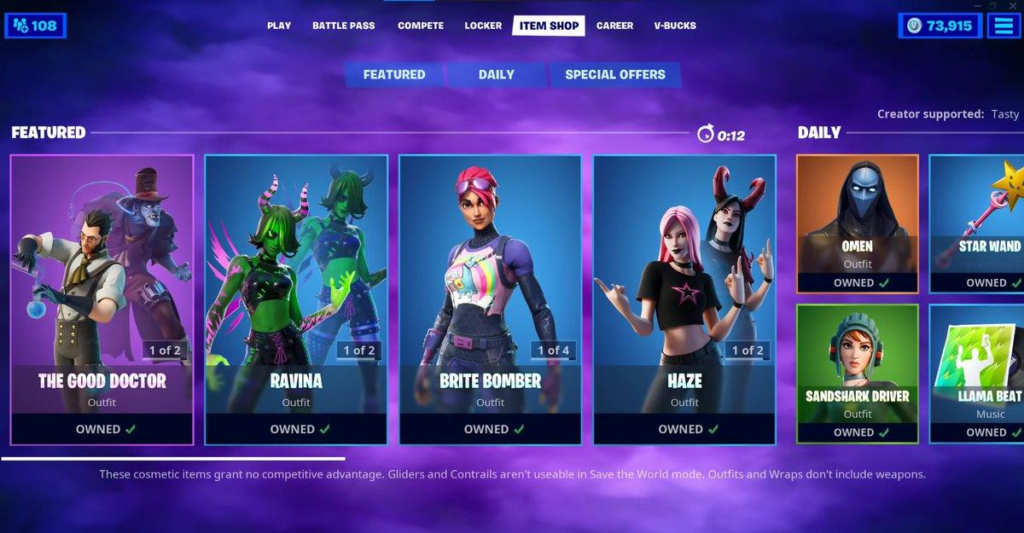
You should see your updated wallet total right away. Head over to the daily item shop. You can use your balance to buy cool new outfits, pickaxes, gliders, or the newest battle pass.
Earn Bonus Epic Rewards
Did you know that using Epic’s payment system gives you perks? When you buy items on PC, mobile, or the web, you get twenty percent back in special rewards.
This is a great way to save a little extra money over time. You can use these rewards toward future digital purchases. It pays to be smart with your digital wallet.
Troubleshooting Common Errors
Sometimes, things do not go perfectly smoothly. What happens if your code does not work? First, check if the code expired. Most codes have a time limit attached to them.
Second, make sure you did not already use that code on another profile. Codes are single-use only. If you still feel stuck, reach out to customer support with your receipt.
Detailed Redemption Steps Reference Table
| Step Number | Action to Take | Important Tip |
| 1 | Scratch the back of the card | Reveal your 16-digit code gently. |
| 2 | Log into your profile | Ensure it is your correct primary profile. |
| 3 | Navigate to the redemption page | Click your display name icon. |
| 4 | Enter the code | Do not include dashes while typing. |
| 5 | Select your platform | Match it to where you actually play. |
| 6 | Hit confirm | Verify your new balance first. |
Frequently Asked Questions
Can I transfer my balance to a friend?
No, balances and funds are locked to a single profile. They cannot be gifted or moved to another person.
Why are my funds missing on my Nintendo Switch?
Nintendo does not use the shared wallet feature. You must spend the funds on the web shop or a linked PC/mobile device.
Do these game cards expire?
Officially, standard game cards do not have expiration dates. However, promotional codes usually have a strict deadline.
Can I use these cards to buy regular store games?
It depends on the card type. Older game cards only give in-game currency, while newer multi-platform cards can buy full games.
What free outfit is available right now?
For a limited time, claiming a gift card unlocks a fun bonus outfit in the game. Check the main site for current event details.
What should I do if my card is damaged?
If you accidentally scratch off the numbers too hard, contact support. You will need to provide clear photos of the card and your store receipt.
Conclusion
Now you know exactly how to redeem v bucks like a true pro! It is a quick and safe process when you follow the official steps. Just remember to verify your profile before hitting that confirm button.
Go grab your favorite new skin or glider from the shop today. Have fun playing, and let me know in the comments what item you plan to buy first!